
How to personalize your candidate messages effectively
Personalize candidate messages with their first name, a profile detail and a clear reason for reaching out. Learn a fast, human method.

To personalize a candidate message effectively, always include three elements: the first name, a sentence that proves you read their profile and a specific reason for reaching out. The fastest method combines a standard template, one personalized sentence and a human check of the draft. When AI generates that draft, always review it before sending.
In short:
- A Hellowork survey shows that 93% of candidates consider it important to receive a reply, while half rarely get one.
- Three minutes of preparation are usually enough to note a recent activity, a key experience and a keyword directly tied to the target role.
- A template can be adapted in 60 to 120 seconds after preparation; for a critical role, add a view of the mission and an informal conversation.
- An AI-generated draft can invent a skill or cite the wrong company; also check the spelling of the name, the job title and the promise.
- Inform the candidate from the first contact with a link to your privacy notice; beyond a reasonable period in the talent pool, a specific legal basis or new consent is required.
Table of contents
- Why personalization changes the response rate
- A repeatable framework to personalize every message
- Ready-to-use templates for your messages and rejections
- Automating generation without losing quality
- GDPR compliance and candidate data retention
- Setting up templates in your recruiting tools
- What our sourcing experience teaches us about personalization at volume
- When to personalize fully, when to automate broadly
- Personalizing at scale with a dedicated sourcing tool
- Frequently asked questions
- Sources
Why personalization changes the response rate
A generic message is spotted in a few seconds and ends up ignored. A Hellowork survey on how candidates feel shows that 93% of candidates consider it important, or even very important, to receive a reply to their application, while half say they rarely get one. This gap explains why a message that mentions a candidate's recent project or a specific skill holds attention better than a mass send.
The effect goes beyond the immediate reply. A candidate who feels read and considered keeps a positive image of the company, even after a rejection, and remains more willing to come back to you for a future role. This matters especially for nurturing a talent pool and generating spontaneous referrals.
Minimal personalization (first name and industry) is enough for a large volume of less qualified applications. For a critical role or a talent shortage, a more crafted message that cites a specific achievement clearly changes the perception and is worth the extra effort.

A repeatable framework to personalize every message
Before writing, three minutes of preparation are usually enough to spot what will make the message relevant.
- Recent activity: a post, a job change or a project mentioned on the candidate's profile.
- Key experience: a skill or achievement that directly matches the target role.
- Role keyword: the technical term or mission that will resonate with their background.
Once these three points are identified, the message structure stays stable: a clear subject line, a personalization sentence that proves you read the profile, a value sentence that explains why this role would interest them, then a short call to action. Phrases like "I saw that you led..." or "your experience with... matches what we are looking for in..." adapt easily from one candidate to the next without rewriting the whole message.
The most common mistake is piling up superlatives or copying a personalization sentence that is too general and could apply to any profile: it cancels the intended effect. Keep a direct, conversational tone, and avoid phrases that sound like a form letter.
Pro tip: Write your personalization sentence last: it will be more precise once the rest of the message is written.
Ready-to-use templates for your messages and rejections
Three formats cover most first-contact situations, from the shortest to the most detailed.
- Short message (LinkedIn, 2-3 lines): first name, one line on an achievement you spotted, one line on the role, a link to the job posting.
- Mid-length message (email, 5-6 lines): precise subject line, personalization sentence, brief presentation of the role and the company, a concrete benefit, CTA (a call or a reply to the message).
- Detailed message (critical role): the previous elements, plus a sentence on the medium-term mission and an opening for an informal conversation before any formal process.
For a rejection, two formats are enough: one that highlights a strength of the profile while explaining the choice made for this specific role, the other that adds a concrete suggestion (a skill to develop, a type of role to aim for) when the candidate was met in an interview. This second format takes more time but clearly strengthens the impression left.
Adapting one of these templates to a new candidate takes between 60 and 120 seconds once the preparation layer is done: just replace the personalization sentence and adjust the link to the relevant role.
Automating generation without losing quality
An AI-generated draft speeds up writing considerably, as long as you keep a systematic human review step. The most reliable workflow follows a simple sequence.
- Extract three key points from the profile (recent activity, experience, role keyword).
- Generate a draft from these points rather than from a vague prompt.
- Check the draft before sending: name spelled correctly, exact job title, realistic promise, tone consistent with your employer brand.
This last step is not optional. Language models sometimes produce factual hallucinations, an invented skill or a reference to the wrong company, which justifies a systematic review before any send. To go further on concrete uses of AI in recruiting, our guide on ways to use AI in recruiting details other use cases that are useful day to day.
Pro tip: To keep a natural tone despite automation, the Branderizing agency offers a method to humanize AI-generated text, especially useful for messages sent at volume.
GDPR compliance and candidate data retention
Contacting a candidate and keeping their contact details requires a precise framework. The French Labor Code sets out the permitted purposes for collecting candidate data: assessing the ability to hold the job or measuring professional aptitudes, nothing broader.
- Inform the candidate from the first contact, through a link to a privacy notice rather than a long text embedded in the message.
- Respect the purpose limitation principle set out in the CNIL recruitment guide.
- Distinguish the ongoing process, the talent pool and the evidentiary archives, each with its own retention rules.
Keeping a profile in a talent pool is generally limited to a period considered reasonable, according to the benchmark set by the competent authorities, beyond which a specific legal basis or new consent becomes necessary. To dig deeper into compliant methods for collecting candidate contact details, our article on how to find candidate emails while respecting GDPR details the practices to favor.
Setting up templates in your recruiting tools
Well-built placeholders turn a rigid template into a message you can personalize at scale. The most useful ones stay simple: {{prenom}}, {{realisation}}, {{poste}} are enough in most cases, as long as you leave room for local editing so the final result does not look automated.
- Create the templates in your ATS with clearly named fields.
- Test each template on a small sample before a general rollout, checking how the variables display.
- Define editing permissions so that no template is changed without approval.
- Log sends to keep a usable record in case a candidate submits an access request.
Governance of these templates is best kept simple: one point person reviews the templates every quarter, using the response rate as the main indicator of relevance.
What our sourcing experience teaches us about personalization at volume
We support recruiters who need to personalize hundreds of messages a week without losing quality. The search engine combines sourcing, contact enrichment and outreach automation on LinkedIn, email and WhatsApp, which lets us see concretely what makes the difference: the personalization sentence matters more than the length of the message. The internal method relies on automatically extracting three key points per profile, followed by draft generation and then human validation before any send, exactly the workflow described above.
When to personalize fully, when to automate broadly
A simple rule of thumb guides us: beyond two minutes spent on a standard message, it is better to delegate the initial writing to an AI draft and focus human effort on the personalization sentence. We have seen this logic pay off on hard-to-fill roles, where one precise line about a candidate's project was enough to turn silence into a phone conversation. Personalization does not need to be long to be effective, it simply needs to be accurate.
Jules
Personalizing at scale with a dedicated sourcing tool
Writing a relevant message means knowing the candidate before writing to them, which requires reliable data you can access quickly. Our Kalent platform gives access to more than 200 million qualified profiles in Europe and the United States, with an enrichment rate that directly makes personalization easier.
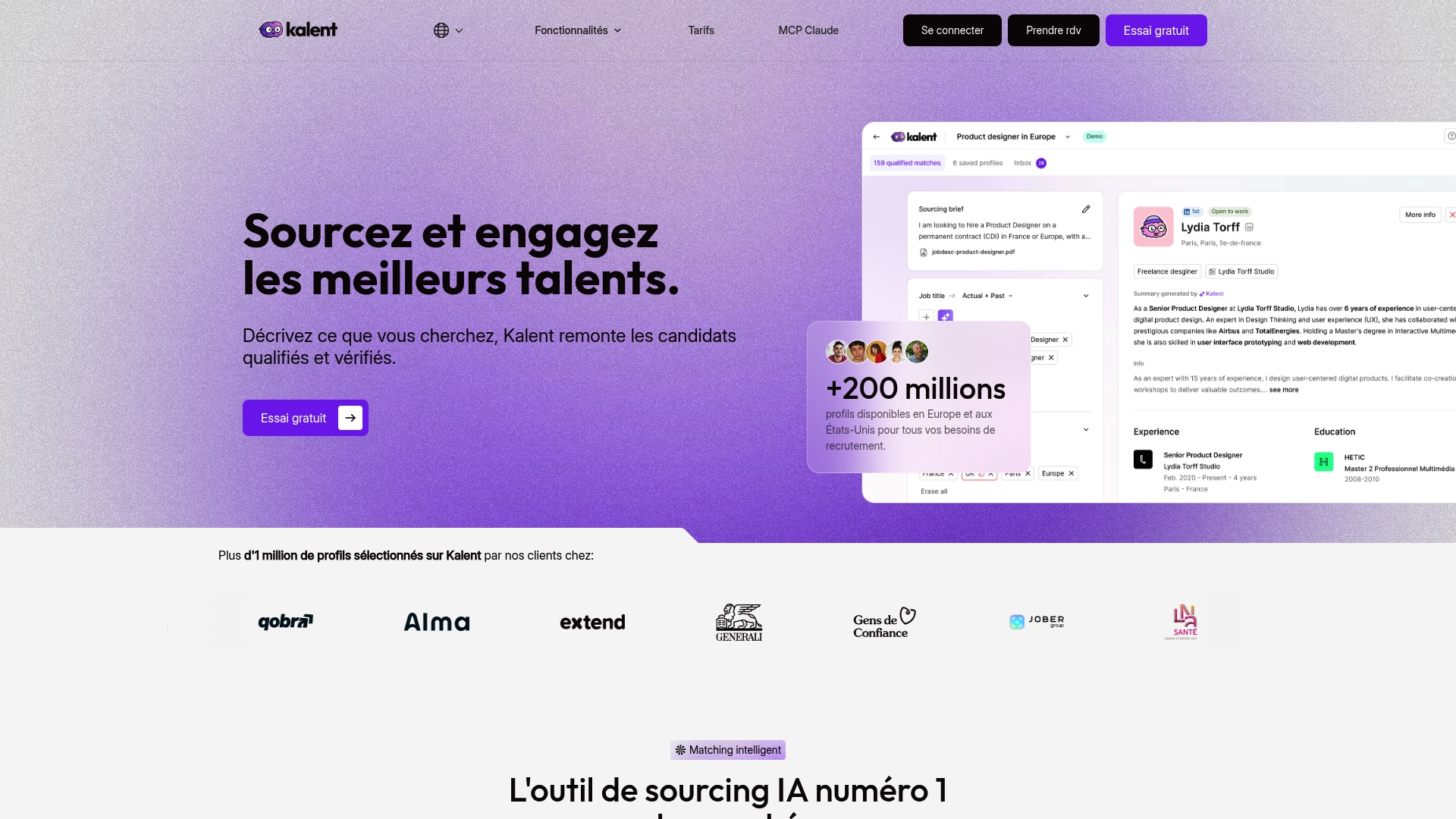
- Search and filtering of profiles based on precise role and experience criteria.
- Contact enrichment, with access to mobile numbers and personal emails to multiply contact channels.
- Automated multichannel outreach (LinkedIn, email, WhatsApp) while keeping control over each message before it goes out.
Our talent search engine fits into the workflow described above: extracting key points, generating a draft, human validation, then sending through the most suitable channel. To compare the available plans, the Kalent pricing page details the Sourcing and Copilot plans. To see how it works on your own recruiting criteria, you can book a demo.
Frequently asked questions
How do you personalize a message to a recruiter?
Mention a specific element of the company or the target role, explain in one sentence why your profile fits, and avoid any generic phrase that could apply to any job posting. End with a clear request, such as a phone call or an interview.
How do you personalize a message?
Identify three elements specific to the recipient: a recent activity, a key experience and a keyword related to the context of the contact. Build these elements into a short structure made of a subject line, a personalization sentence and a call to action.
How do you write an unsolicited application message?
Start with a sentence that shows you know the company's business or a recent project, then connect your experience to a concrete need you have identified. Keep the message short and explicitly suggest a conversation, rather than passively waiting for a reply.
What is a personalized message?
A personalized message relies on information specific to the recipient rather than on a phrase that could apply to anyone. It can be limited to a single targeted sentence, as long as it proves a real reading of the profile or the context.
Sources
- Economie
- Recruitment guide: the fundamentals of personal data protection, CNIL (pdf)
- How to give a candidate personalized feedback quickly, Helloworkplace
- AI hallucination, Rubrik insights


